How to Download Spotify Music on Android
Quick answer: To save music for offline playback inside Spotify on Android, open a playlist or album in the Spotify app and tap Download. Music downloads through Spotify require an eligible Premium plan; free accounts can download podcasts, not music. If you need a separate audio file rather than Spotify-only offline playback, you can use our web-based Spotify Downloader and dedicated tools like the Spotify Music Downloader, saving only content you hold the legal right or permission to download.
Choose the type of download you need
On Android, "download Spotify music" means one of two things: saving tracks inside the Spotify app for offline playback, or downloading a separate audio file for an external music player. The two options are not the same.
| Method | What you get | Main requirement |
|---|---|---|
| Spotify app download | Offline playback inside Spotify | Eligible Premium plan for music |
| Spotify-Downloads.com tools | A separate audio file (e.g., MP3) | A compatible public Spotify link; rights or permission to download the content |
Spotify's built-in downloads are encrypted and managed directly by the Spotify app. They are not ordinary MP3 files that you can freely transfer to a microSD card, USB drive, or another music player. For official plan and feature details, check Spotify's official offline listening documentation.
If you want to work with standalone audio files, start at our Spotify Downloader homepage. For specific formats and content types, our specialized tools streamline each task:
- Single tracks and mixed links: Spotify Music Downloader or Spotify Song Downloader
- Curated collections and tracklists: Spotify Playlist Downloader
- Full artist discographies and releases: Spotify Album Downloader
- Bulk multi-track packages: Spotify Playlist ZIP Downloader
- Standard audio format conversion: Spotify to MP3
- Spoken word episodes: Spotify Podcast Downloader
Review the specific tool page for its supported links, options, and guidelines before starting.
Download music for offline listening in Spotify
The official Spotify app is a straightforward option when you want your music to stay inside Spotify and play without an active mobile data or Wi-Fi connection.
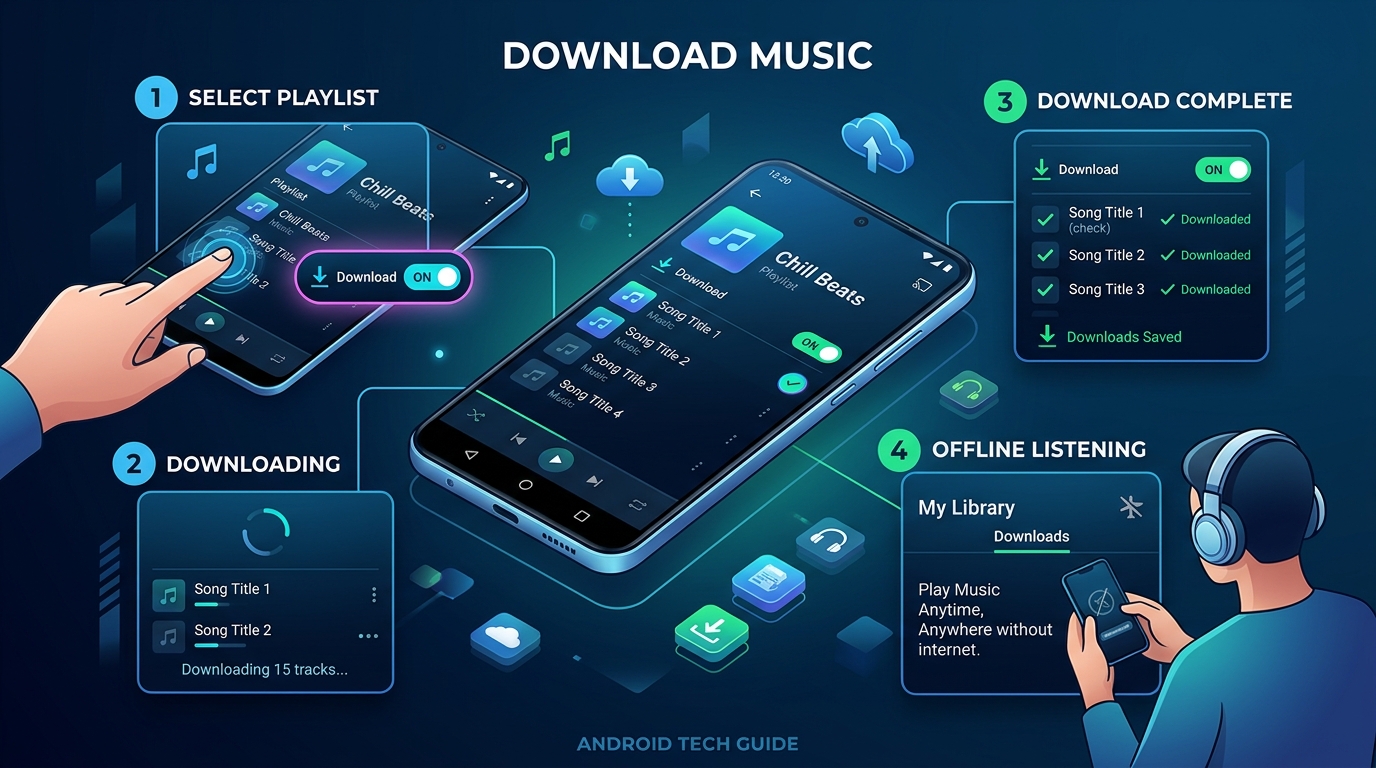
Steps on an Android phone
- Connect your phone to Wi-Fi or mobile data and open the Spotify app.
- Find the album or playlist you want to listen to offline.
- Open it and tap Download (the downward-arrow icon, where shown).
- Keep Spotify open or allow it to finish downloading in the background, according to your Android battery and background settings.
- Look for the green downward-arrow indicator on each track, and test playback in Airplane Mode before heading offline.
To save only a single song, add that song to a custom playlist, then download that playlist. Spotify's support instructions explain that individual tracks cannot be downloaded as standalone items through the official mobile offline workflow. Alternatively, you can save single tracks directly using our Spotify Song Downloader.
Downloading Spotify music without Premium
Spotify's standard offline music downloads are strictly a Premium feature. Free accounts can download podcasts, but not music for offline playback through Spotify. Plan details can vary by country, so check Spotify's official subscription terms for your region if you are deciding whether to subscribe.
Use mobile data or Wi-Fi
Spotify normally restricts downloads to Wi-Fi to prevent unexpected cellular data overage. To allow downloads over mobile data, open Spotify and tap your Profile picture → Settings and privacy → Data-saving and offline, then toggle the cellular download setting on. If your mobile data plan is limited, download large playlists or complete albums via Spotify Album Downloader while connected to home Wi-Fi instead.
Keep downloads available
Spotify requires users to reconnect to the internet at least once every 30 days to keep offline downloads active. Device storage space, operating system cache clearings, and account limits (up to 10,000 tracks per device on up to five devices) can also impact download availability. Remember that these tracks remain tied exclusively to the Spotify app cache.
Save a Spotify track as an audio file on Android
An offline download inside Spotify will not meet every need. It cannot help if you want to listen through another Android media player (such as VLC, Poweramp, or Musicolet), transfer files to an external storage card, back up audio you are authorized to use, or edit audio outside Spotify. A standalone audio file provides an independent format and workflow.
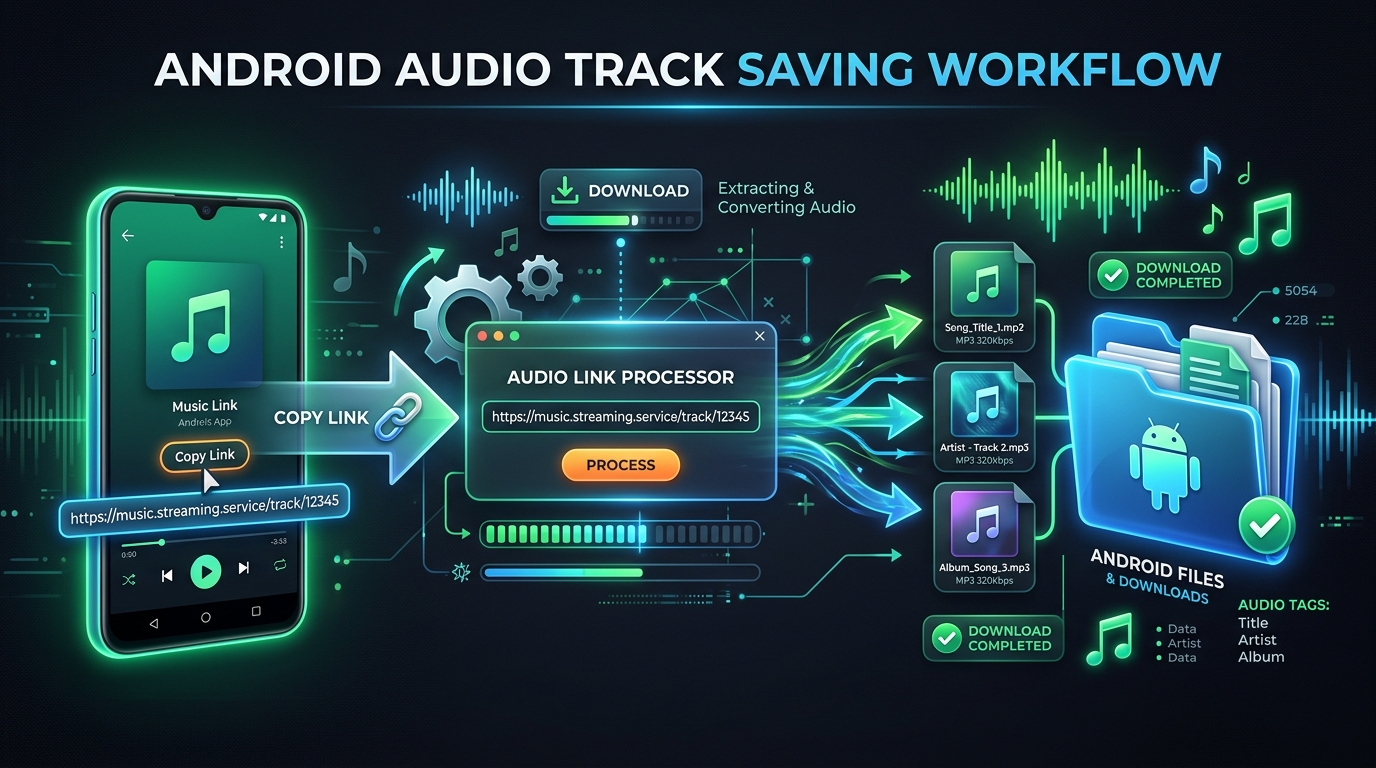
Step-by-step: use Spotify-Downloads.com on Android
- Open Spotify: Find the song, album, or playlist you want to work with.
- Copy the share link: Tap the three-dot menu (...) for the item, tap Share, and choose Copy link.
- Open your browser: In your Android browser (Chrome, Firefox, Samsung Internet, or Brave), visit Spotify-Downloads.com.
- Paste the link: Paste the copied Spotify URL into the search bar and tap Download.
- Select your tool: For full playlists, switch over to the Spotify Playlist Downloader. For entire studio albums, open the Spotify Album Downloader. For quick archive downloads, use the Spotify Playlist ZIP Downloader.
- Save the file: Review the track details and confirm the download. When Android prompts you to save the file, confirm the destination folder.
- Locate your audio: Check your browser's Downloads tab or open the Android Files app (under Internal storage / Download). You can now play your MP3 tracks in any Android media player.
Before using any third-party service, verify that you hold the necessary rights or permission. Do not redistribute, resell, or use downloaded copyrighted music commercially without authorization. Spotify-Downloads.com is an independent platform and is not affiliated with or endorsed by Spotify AB.
Fix common Spotify download problems
If your Spotify downloads fail or stop on Android, check these proven solutions:
- Download button missing: Confirm your account has an active Premium subscription. Remember that Spotify does not show download buttons for individual tracks; add the track to a playlist first.
- Download stops partway: Check your available device storage. On Android, aggressive battery savers often kill background processes; go to Android Settings → Apps → Spotify → Battery and select Unrestricted.
- Downloads disappear: Spotify requires you to connect online at least once every 30 days. Clearing the app cache or reinstalling Spotify will also remove offline files.
- Link gets rejected: Ensure you copied a valid public Spotify link. Private playlists or regional-locked content cannot be resolved. Copy the link fresh from the Share menu.
- Audio will not play: Check your Android Files app to ensure the file finished downloading completely. Partial downloads will not render waveforms or play smoothly in external media players.
Avoid installing unverified third-party APKs or modified apps claiming to unlock Premium features. These often violate terms of service, compromise account security, or introduce malware. Stick to verified web tools and never share your Spotify credentials.
Key takeaways
- Use Spotify's official Download button for offline playback inside the Spotify app; this requires an active Premium plan.
- Add individual songs to a playlist to download them within the Spotify mobile app.
- When you need universal MP3 files for external Android audio players, use our Spotify Downloader or Spotify Music Downloader.
- For larger collections, utilize the Spotify Playlist Downloader or Spotify Album Downloader.
- Verify storage, battery optimization settings, and internet access whenever a download pauses or fails.
- Always respect copyright and ensure you have permission to download and store media files.
Frequently asked questions
How do I download Spotify music on Android? Open an album or playlist in the Spotify app and tap the Download arrow while connected to the internet. Music downloads require an active Premium plan. To save a single song, add it to a playlist first.
Can I download Spotify songs on Android without Premium? Spotify's official in-app music downloads require a paid Premium subscription; free users can only download podcasts. For standalone audio files, use our web-based Spotify Downloader and ensure you have permission to save the audio.
Does Spotify save downloaded songs as MP3 files? No. Spotify stores offline downloads as encrypted cache data within the application. They cannot be extracted as regular MP3 files or played in other Android media players.
Where can I find Spotify downloads on my Android phone? Official Spotify offline tracks are stored in protected application data folders accessible only by Spotify. Audio files downloaded through our website are saved directly to your device's standard Download folder inside the Files app.
Why is Spotify not downloading songs on Android? Common causes include an expired Premium plan, insufficient phone storage, unstable network connections, or Android battery optimization killing the app in the background.
Can I download a whole Spotify playlist on Android? Yes. Inside Spotify, tap Download at the top of the playlist if you have Premium. To save files to your device storage, use our Spotify Playlist Downloader or Spotify Playlist ZIP Downloader.
Can I download a full Spotify album on Android? Yes. In Spotify Premium, open the album and tap Download. To save individual MP3 tracks of the entire album for any player, use our Spotify Album Downloader.
Is Spotify-Downloads.com an official Spotify service? No. Spotify-Downloads.com is an independent third-party website and is not affiliated with or endorsed by Spotify AB.
Conclusion
Downloading Spotify music on Android depends on how you plan to listen. For listening strictly within Spotify during your commute, the official Premium offline mode is fast and integrated. For permanent audio files that you can play across all Android media apps, DJ software, and backup drives, an audio file workflow is required.
Select the tool that matches your media: save full tracklists with our Spotify Playlist Downloader, grab entire albums with the Spotify Album Downloader, or convert single tracks with the Spotify to MP3 converter. Always verify you have the legal right or permission before downloading and saving audio files.