How to Download Spotify Podcasts and Listen Offline
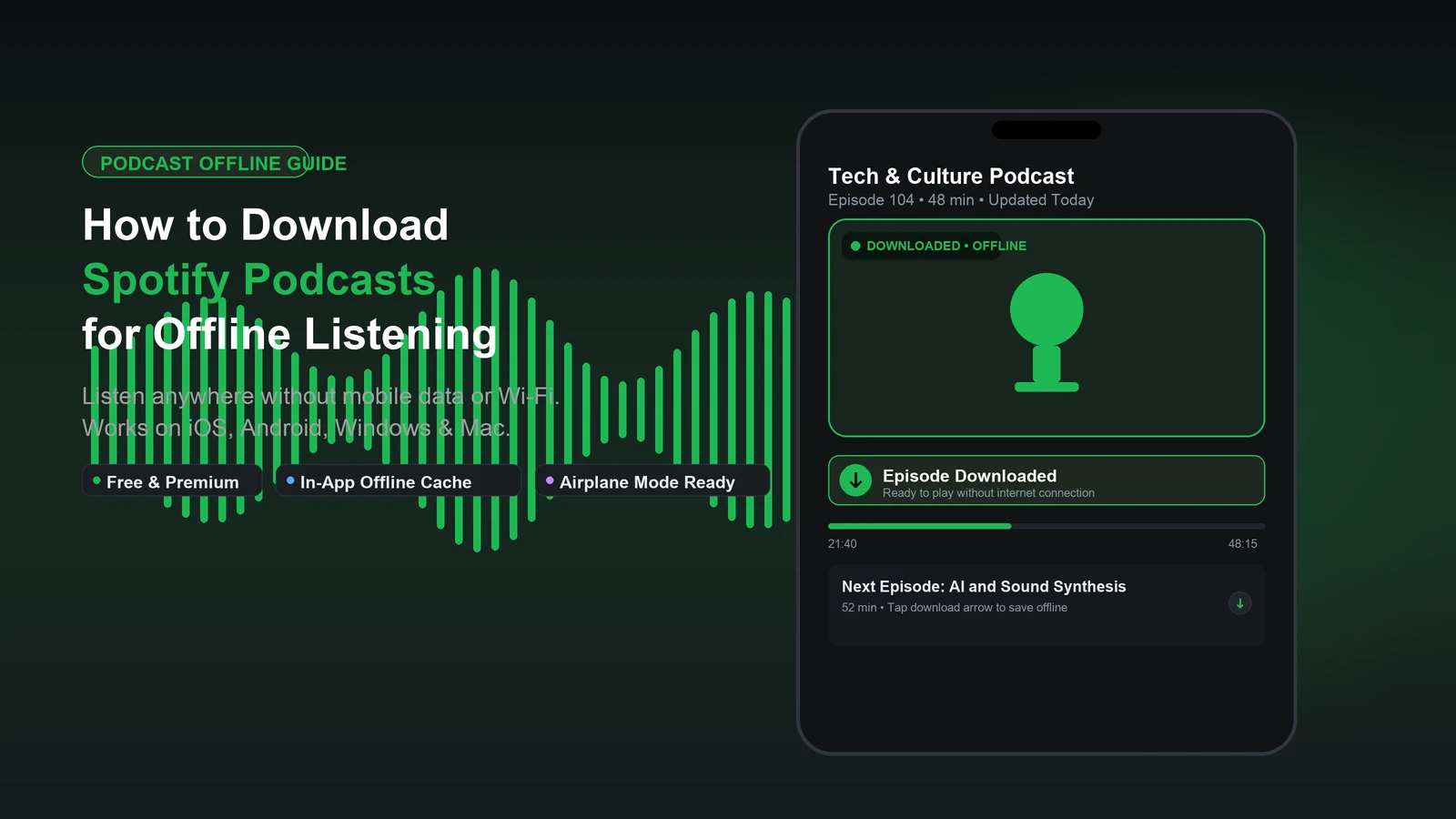
You can download many Spotify podcast episodes and listen without an internet connection, even with a free account. Open the episode in the Spotify app, select its Download icon, and wait for the completed-download indicator. Then find the episode in Your Library and play it offline. Some shows require Premium, and downloads remain inside Spotify rather than becoming transferable MP3 files.
For audio you are authorized to save outside the app, the Spotify Podcast Downloader offers a browser-based option for episode links. Check that the audio source permits downloading each recording before proceeding.
Key takeaways
- Most eligible audio podcast episodes can be downloaded with Spotify Free or Premium; some shows may require Premium.
- Download episodes in the Spotify app while connected to Wi-Fi or mobile data. Browser playback in the Web Player does not support offline downloads.
- A completed download plays without internet, but Spotify requires an online connection at least once every 30 days to maintain offline access.
- Saved and downloaded are different states. Always verify the green download indicator before traveling.
- Spotify's in-app downloads are encrypted cache files, not standalone MP3 files you can freely move to other players.
Table of Contents
- How to download Spotify podcasts on iPhone or Android
- How to download Spotify podcasts on Windows or Mac
- How to listen to downloaded Spotify podcasts offline
- Can you save a Spotify podcast as an MP3 file?
- Why are Spotify podcasts not downloading?
- How to manage podcast downloads and storage
- Frequently asked questions
- Final checklist before you go offline
How to download Spotify podcasts on iPhone or Android
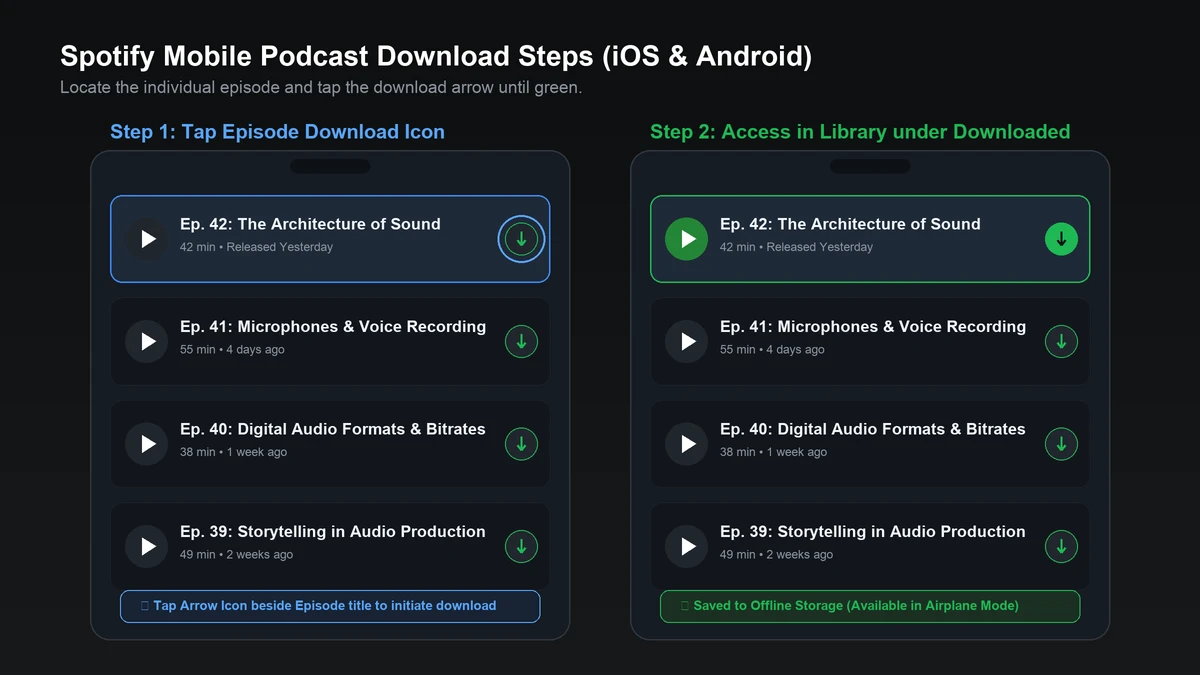
Find an individual podcast episode and tap Download. The iPhone and Android workflows are identical, although icon placement can slightly shift with application updates.
- Open the Spotify mobile app while connected to Wi-Fi or cellular data.
- Search for the podcast by show name or episode title.
- Open the show's episode list and choose the episode you want.
- Tap the downward-pointing Download icon for that episode. If you only see a three-dot menu, tap options to reveal the download action.
- Wait until Spotify shows the green completed-download indicator before disconnecting.
- Open Your Library and tap the Downloaded filter at the top to quickly access your offline content.
Following or saving a show organizes it in your library, but it does not download its episodes automatically.
Can you download Spotify podcasts without Premium?
Yes, many podcast episodes are downloadable on Spotify Free. Unlike music downloads, which require a paid Premium subscription, Spotify allows free users to download podcasts for offline playback. However, individual creators or exclusive shows may occasionally restrict offline access to Premium subscribers.
How to download Spotify podcasts on Windows or Mac
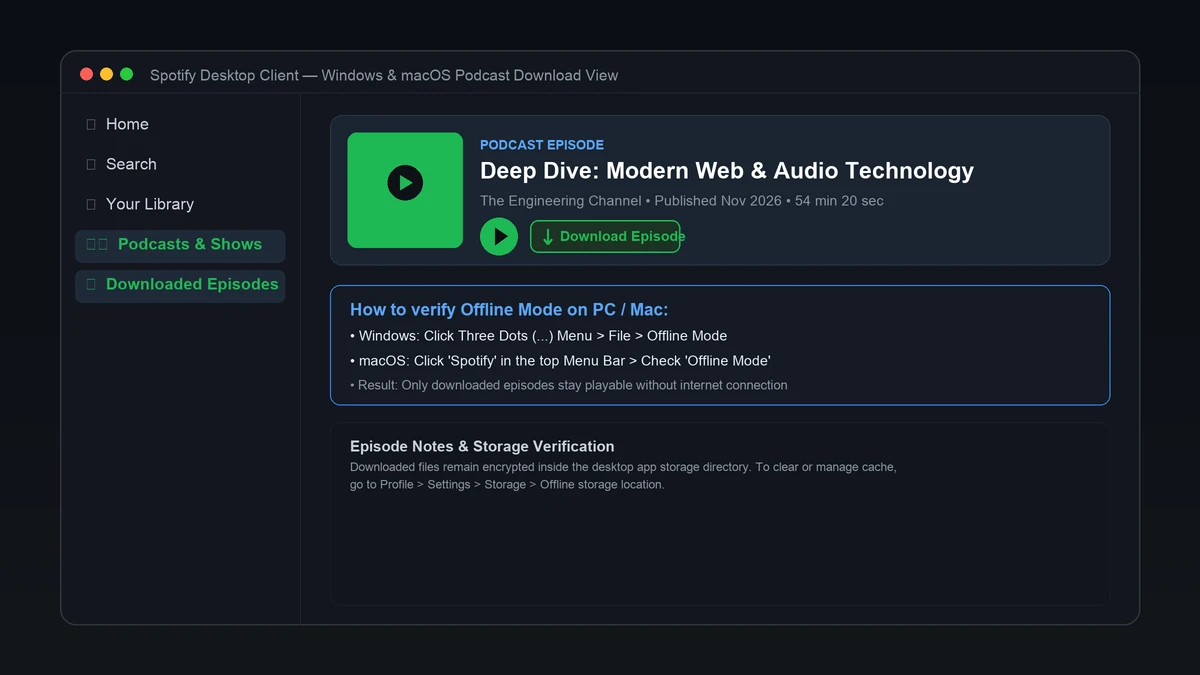
Use Spotify's desktop application and select the Download control on an eligible episode. The web player streams content in your browser but does not support offline app downloads.
- Install or launch the Spotify desktop app on Windows 10/11 or macOS.
- Sign in to your account and search for the desired podcast.
- Open the individual episode page or locate it in the show list.
- Click the episode's downward-arrow Download icon.
- Wait for Spotify to indicate that the download has completed with a green icon.
- Disconnect briefly or switch to Offline Mode to confirm the episode plays smoothly.
If the Download button is missing, update your desktop app to the latest version and verify whether the specific episode has download restrictions.
How to listen to downloaded Spotify podcasts offline
Downloaded episodes normally play automatically when your internet connection drops. You can also manually switch on Offline Mode to restrict playback exclusively to locally cached content and prevent unwanted streaming over mobile data.
- iPhone & Android: Tap your profile picture, select Settings and privacy, choose Data-saving and offline, and toggle on Offline mode.
- Windows: Click the three-dot menu at the top of the desktop app, choose File, and check Offline Mode.
- macOS: Click Spotify in the menu bar at the top of your screen and select Offline Mode.
Undownloaded episodes will appear grayed out in Offline Mode. Always test playback in airplane mode before boarding a flight.
Do Spotify podcast downloads expire?
Spotify requires your device to connect online at least once every 30 days to retain offline access. Downloads can also disappear if you reinstall the app, log out, exceed the five-device offline limit, or if the publisher removes the episode from Spotify.
Can you save a Spotify podcast as an MP3 file?
Spotify's in-app downloads and standalone MP3 files serve two entirely different purposes. The app stores encrypted cached audio for playback strictly within Spotify. An MP3 is an open audio file that compatible media players, car stereos, and portable devices can play without any streaming subscription.
For podcast audio you created, own, or have explicit legal authorization to download as a standalone file, our browser-based tools provide a convenient workflow using the episode share link:
- Open the specific podcast episode in Spotify.
- Select Share and click Copy Episode Link (the URL typically contains
/episode/). - Visit our Spotify Podcast Downloader and paste the link into the input field.
- Review the available options and save the authorized audio file to your device.
For standard songs and music tracks, our Spotify Music Downloader provides a dedicated tool tailored for music links.
Why are Spotify podcasts not downloading?
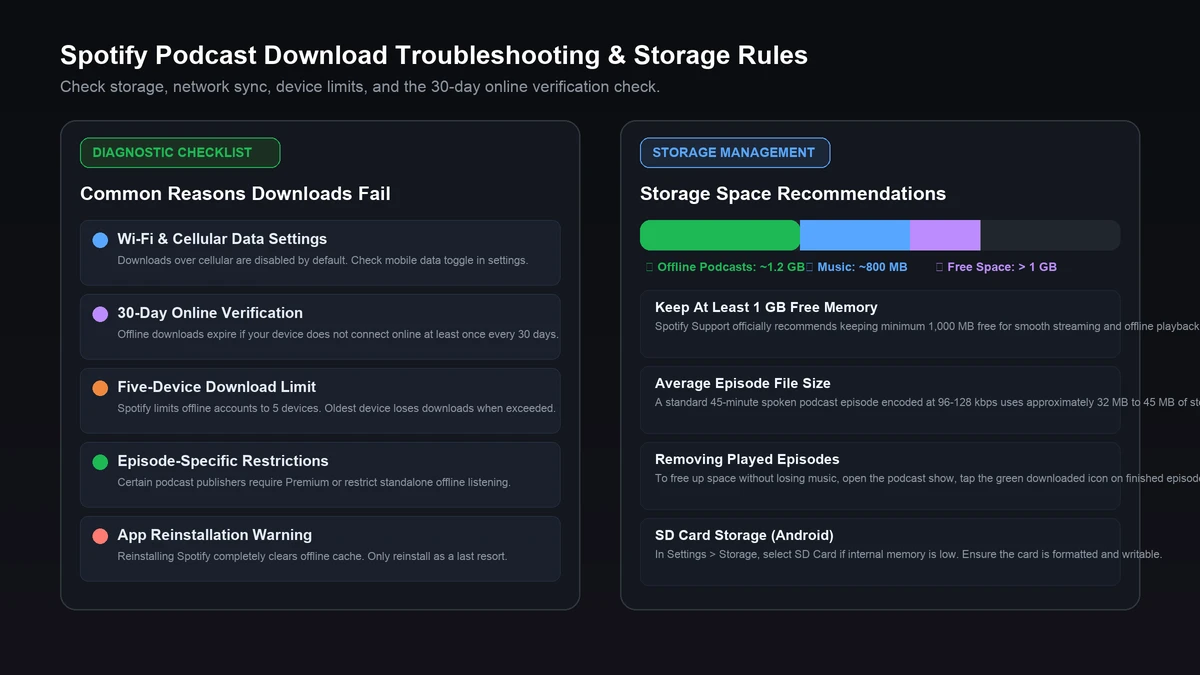
Check your internet connection, available storage, and episode-specific status to diagnose most download issues quickly.
| Problem | What to check |
|---|---|
| No Download icon | Open the specific episode, update Spotify, or check if the show requires Premium. |
| Download stuck or slow | Switch to stable Wi-Fi, verify free disk space, and check battery-saver restrictions. |
| Episode saved but unavailable offline | Confirm the green download arrow is visible; saving a show does not download episodes. |
| Downloads disappeared | Reconnect online to verify 30-day sync, check device limits, and avoid reinstalling the app. |
| One episode fails to download | Test another episode to distinguish general app issues from publisher restrictions. |
| Downloads fail on SD card | Verify that the SD card is recognized, formatted properly, and has free space. |
Spotify recommends keeping at least 1 GB (1,000 MB) of free storage for smooth playback and caching. Furthermore, Spotify enforces a maximum limit of 5 devices for offline downloads. If you download on a sixth device, the oldest device will automatically lose its offline content.
How to manage podcast downloads and storage
Podcast episodes typically range from 30 minutes to over two hours and can quickly consume device storage. Regularly removing played episodes keeps your device running smoothly.
To remove an individual episode, tap the green downloaded arrow on the episode page and confirm Remove download. On mobile, you can also perform a bulk cleanup by going to Settings and privacy > Storage > Remove all downloads. Note that this clears all offline music and podcast tracks simultaneously.
For larger playlist collections of authorized tracks, our Spotify Playlist Downloader supports batch playlist links, and our Spotify to MP3 Downloader covers individual audio tracks.
Frequently asked questions
Are Spotify podcasts free to download?
Yes. Many eligible podcast episodes can be downloaded with a free Spotify account. While catalog music downloads require Spotify Premium, podcast episodes are generally available for offline listening on Spotify Free, unless an individual publisher requires Premium.
Can I listen to downloaded Spotify podcasts in airplane mode?
Yes. Once an episode is completely downloaded and shows the green indicator, you can turn on airplane mode or disconnect from Wi-Fi and mobile data. The episode will play directly from your device storage.
Why does a podcast show appear saved but not downloaded?
Following or saving a podcast show simply adds it to your library shortcuts. To listen without internet, you must manually tap the download arrow on each specific episode you wish to store locally.
Where are downloaded Spotify podcasts stored on my computer or phone?
Spotify stores offline podcasts in proprietary encrypted cache files within the application directory. They are not saved as ordinary MP3 files and cannot be directly opened by third-party media players.
Do I need internet to play an already downloaded episode?
No internet connection is required for playback of a downloaded episode. However, Spotify requires you to connect to the internet at least once every 30 days so the app can verify active account status.
Will deleting the Spotify app remove my downloaded podcasts?
Yes. Uninstalling or reinstalling the Spotify app completely deletes all locally stored offline cache files, including podcasts and music. You will need to download your episodes again after reinstalling.
Final checklist before you go offline
Select your preferred episodes while connected to Wi-Fi, ensure each shows the completed green download indicator, verify you have at least 1 GB of free disk space, and briefly test playback in airplane mode. This ensures uninterrupted listening during flights, subway commutes, or road trips. For portable audio files, always verify that you possess the necessary distribution or download authorization.