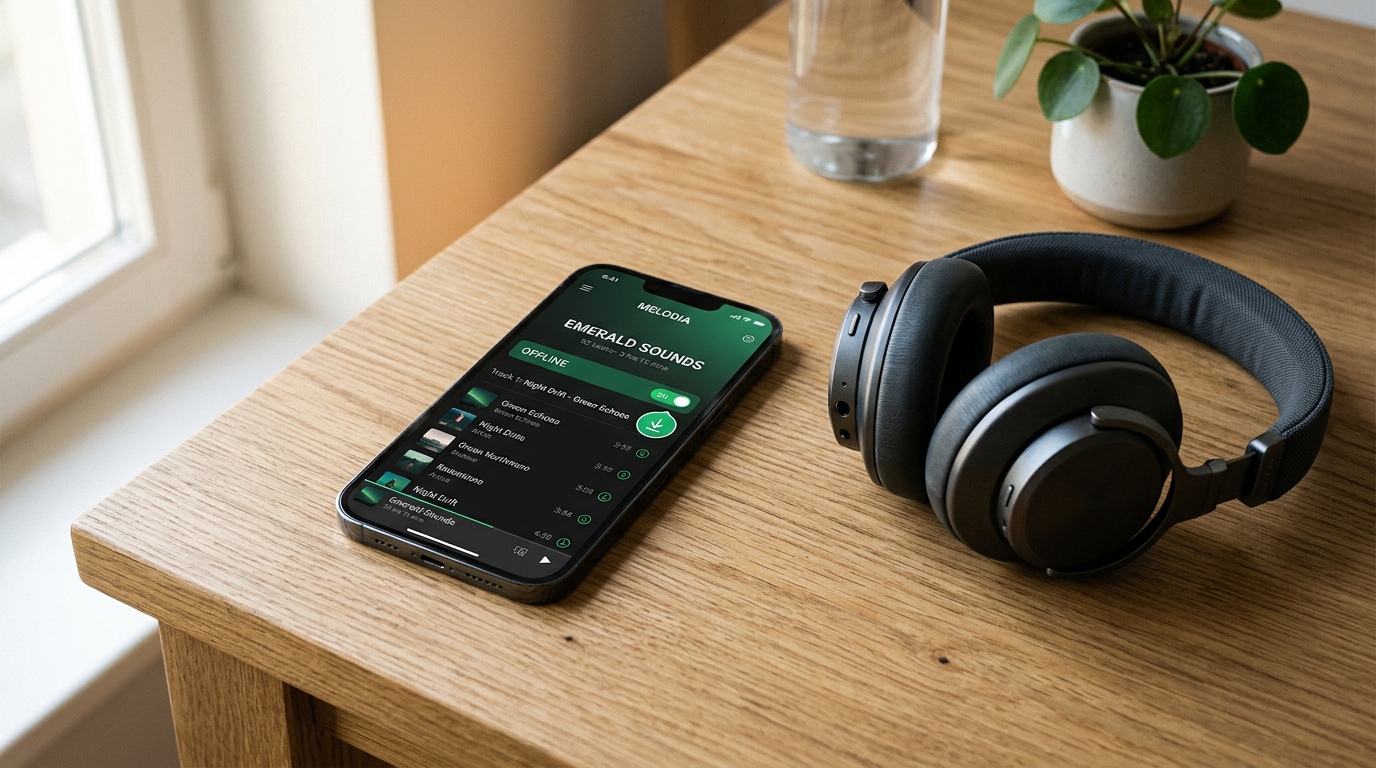
Can You Download Spotify Songs Without Premium?
Quick answer: No. Spotify Free does not include the official in-app feature for downloading music and listening offline. Free accounts are limited to streaming music online and downloading supported podcast episodes; offline music playback requires an eligible Spotify Premium plan. Furthermore, Spotify's built-in offline downloads are encrypted app cache files rather than standalone audio files. If you need portable audio tracks for personal use, you can use our web-based Spotify Downloader along with specialized tools like the Spotify Music Downloader, Spotify Playlist Downloader, and Spotify Album Downloader, saving only content you hold the legal right or permission to download.
Table of contents
- What can Spotify Free download?
- Why does Spotify require Premium?
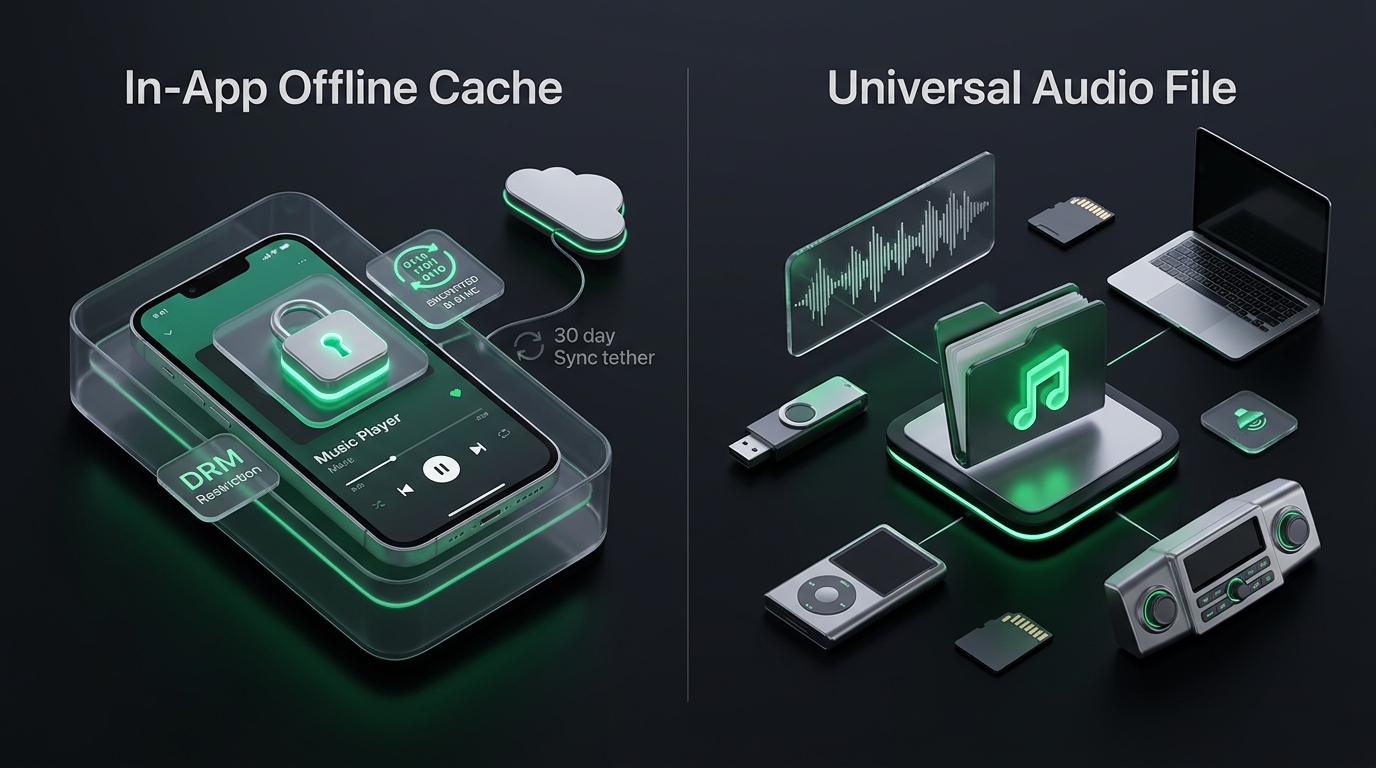
- In-app offline cache vs. standalone audio files
- Alternatives for listening without Premium
- How to download songs, playlists, and albums with Spotify-Downloads.com
- Fix common Spotify download problems
- Key takeaways
- Frequently asked questions
- Conclusion
What can Spotify Free download?
Spotify Free does not provide the standard in-app music download feature. Free listeners can stream millions of songs with occasional commercial interruptions and download supported podcasts for offline listening. In-app offline music downloads (including full tracks, complete albums, and curated playlists) are strictly reserved for paid Spotify Premium subscribers.
| Feature | Available with Spotify Free? | What it means |
|---|---|---|
| Stream music online | Yes (Ad-supported) | Play tracks while connected to Wi-Fi or mobile data |
| Download podcasts in Spotify | Yes | Save supported podcast episodes directly for offline playback |
| Download music in Spotify | No | In-app offline playback requires an active Premium plan |
| Save standalone audio files (MP3) | Not a Spotify feature | Requires a separate external audio tool and proper rights |
Spotify's built-in downloads are managed and encrypted directly inside the Spotify app. They are not standard MP3 files that can be copied to a USB drive or transferred to another media player. For official documentation, refer to Spotify Support's offline-listening guidance and the Spotify Premium plan details.
Why does Spotify require Premium?
Spotify includes offline music downloads as a core incentive of its paid Premium tiers. The feature enables eligible subscribers to store music locally inside the app and listen without an active internet connection or mobile data usage.
Spotify's music licensing contracts with record labels, artists, and distributors dictate that free, ad-supported accounts generate royalties through stream impressions and ad deliveries. When music is played offline, ads cannot be served dynamically in the same way, which is why offline access is tied to subscription revenue.
Premium offline downloads come with specific technical and policy rules:
- 30-day reconnection rule: Spotify requires your device to connect to the internet at least once every 30 days. This allows Spotify to verify your active subscription status and refresh content licensing tokens.
- Device and track limits: Spotify allows downloads of up to 10,000 tracks per device on up to five separate devices per account.
- Regional availability: Specific subscription tiers (such as Individual, Duo, Family, and Student) and offline features can vary depending on your country.
Does Spotify Premium download music as MP3?
No. A common misconception is that Spotify Premium exports regular MP3 files. In reality, Spotify's offline downloads are encrypted, proprietary audio chunks stored in protected app cache folders. They are playable only within the authorized Spotify application on the registered device.
They cannot be exported to an SD card, burned to an audio CD, or loaded into external media software like VLC, Windows Media Player, or DJ applications. Standalone audio files require a fundamentally different workflow.
In-app offline cache vs. standalone audio files
Understanding the difference between an app-managed offline cache and a standalone universal audio file clarifies what you need:
- Storage location: Spotify offline files remain encrypted in hidden application directories. Standalone audio files (such as MP3 or AAC) are saved to your device's standard downloads folder and accessible via your operating system file manager.
- Playback compatibility: App cache files play solely inside the Spotify client. Standalone files play across any media player, car stereo, smart speaker, portable MP3 player, or offline hardware.
- Lifespan and persistence: If your Spotify subscription lapses, or if you remain offline for longer than 30 days, your in-app downloads become inaccessible. Standalone audio files remain permanently on your drive.
- Customization and editing: App cache files cannot be edited or converted. Standalone files can be imported into video editors, DJ software, or ringtone creators for authorized personal projects.
Alternatives for listening without Premium
If you do not have Spotify Premium and need offline listening capability, several options exist depending on your goals:
1. Download music directly from artists and authorized digital stores
When an independent artist, band, or digital music store (such as Bandcamp) offers free or purchased downloads, you can save the MP3, AAC, or FLAC files directly to your computer or smartphone. You can then play these files using any media player without needing a Spotify subscription. Always check the provider's licensing terms before downloading or distributing files.
2. Download supported podcasts for offline listening
If you enjoy talk shows, educational series, or news, Spotify Free allows you to download supported podcast episodes directly within the mobile app. Navigate to the podcast episode page and tap the Download arrow. This gives you free offline listening within the official app for non-music content.
3. Use Spotify-Downloads.com for supported link workflows
When you need standalone audio files for personal use rather than app-tethered streaming, Spotify-Downloads.com provides dedicated online utilities tailored to different Spotify link types:
- Single tracks and songs: Use the Spotify Song Downloader or Spotify Music Downloader to process individual track links.
- Curated playlists: Turn your favorite collections into offline audio using the Spotify Playlist Downloader.
- Full studio albums: Process entire discographies and album tracklists with the Spotify Album Downloader.
- Batch playlist archives: Download all songs in a playlist bundled together into an easy-to-manage ZIP archive with the Spotify Playlist ZIP Downloader.
- Universal audio conversion: Convert music links into universal, high-compatibility audio files with Spotify to MP3.
- Spoken word shows: Save public audio episodes via the Spotify Podcast Downloader.
Supported link formats and features are subject to service availability. Always check the specific tool page for current guidelines.
Important legal notice: Spotify-Downloads.com is an independent third-party website. It is not affiliated with, sponsored by, or endorsed by Spotify AB. Use third-party download services solely for media you own or have obtained legal permission to download. Do not redistribute copyrighted recordings or use them commercially without proper authorization.
How to download songs, playlists, and albums with Spotify-Downloads.com
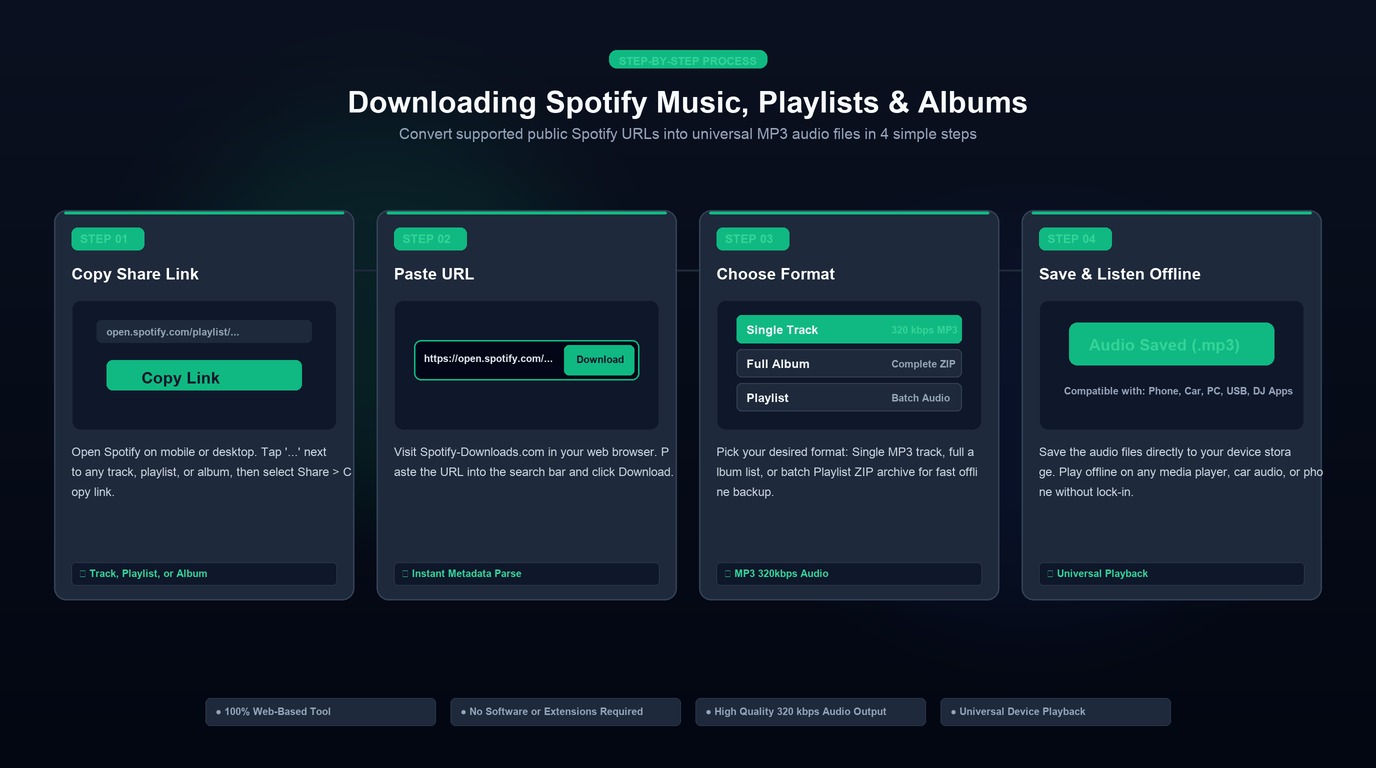
Using Spotify-Downloads.com to save audio files from supported links follows a straightforward, web-based process:
- Locate your music in Spotify: Open the Spotify desktop app, mobile app, or web player, and navigate to the song, album, or playlist you want to process.
- Copy the link: Click the three dots (...) next to the title, select Share, and click Copy link.
- Select the appropriate tool:
- For single songs, open the Spotify Song Downloader or Spotify Music Downloader.
- For full playlists, navigate to the Spotify Playlist Downloader.
- For complete studio albums, go to the Spotify Album Downloader.
- For a bulk ZIP package of an entire playlist, open the Spotify Playlist ZIP Downloader.
- Paste and analyze: Paste the copied Spotify URL into the input field and click Download. The tool will fetch track metadata, titles, artists, and cover artwork.
- Save your audio file: Select your preferred audio quality (such as 320 kbps MP3 via our Spotify to MP3 tool) and click save. The file will download to your device's default Downloads directory.
- Enjoy offline anywhere: Transfer the downloaded MP3 to any music player, smartphone, USB flash drive, or offline media system.
Security best practices
- Never share your password: Safe web downloaders only require a public Spotify share URL. Do not enter your Spotify email or password on third-party websites.
- Avoid unofficial APKs: Do not download modified "Spotify Premium APK" files or untrusted browser extensions promising free Premium features. These files frequently carry malware, track sensitive credentials, or lead to Spotify account suspensions.
- Verify file integrity: After downloading, verify that the file size matches an audio track and opens smoothly in your default media player.
Fix common Spotify download problems
If you experience issues downloading or playing music offline, review these common solutions:
- Download button is missing in Spotify: In-app music downloads require an active Premium plan. If you are on a free account, only podcast episodes display a download button. Additionally, on mobile devices, individual songs must be added to a playlist before they can be downloaded inside Spotify.
- Downloads disappear or stop playing: If you have not connected your Spotify app to the internet in over 30 days, your offline permissions expire until you reconnect. Downloads will also be cleared if you reinstall the Spotify app or clear the app's cache in system settings.
- Tool rejects the Spotify URL: Ensure you copied a standard public Spotify URL (e.g.,
https://open.spotify.com/track/...,.../album/..., or.../playlist/...). Private or collaborative playlists without public sharing enabled cannot be resolved. - Audio file will not open: Verify that the file download completed 100%. Incomplete or interrupted downloads will fail to decode in standard media players. Re-download the track or playlist using the Spotify Playlist Downloader.
Key takeaways
- Spotify Free does not include offline music downloads inside the Spotify app; only podcast downloads are available without a subscription.
- Spotify Premium provides in-app offline playback, but files are encrypted cache data rather than standard MP3 files.
- Premium downloads require connecting to the internet once every 30 days and have a limit of 10,000 songs across up to 5 devices.
- Standalone audio files (such as MP3) offer universal playback across all devices, media players, and external drives without app lock-in.
- For authorized personal backups, tools on Spotify-Downloads.com (including the Spotify Playlist Downloader, Spotify Album Downloader, and Spotify to MP3 converter) enable quick, format-friendly saving.
- Always respect intellectual property and download only content you have the right or permission to use.
Frequently asked questions
Can you download Spotify songs without Premium? No, not within the official Spotify application. Spotify Free allows online streaming with ads and offline podcast downloads, but in-app music downloads require an eligible paid Premium subscription. For standalone audio files, external web tools like Spotify-Downloads.com can process supported public links, provided you have permission to download the content.
How can I listen to Spotify music offline for free? Within Spotify, free accounts can only download podcasts for offline playback. To listen to music offline without paying for Premium, you can download music from independent platforms and artists that offer free downloads, or use web-based utilities like the Spotify Song Downloader for authorized tracks.
Does Spotify Premium let you download songs as MP3 files? No. Spotify Premium saves encrypted cache files that only the Spotify app can decode. They cannot be exported as MP3 files, transferred to a USB drive, or played on non-Spotify media players.
Can I download a full Spotify playlist without Premium? In the Spotify app, downloading entire playlists offline requires Spotify Premium. To obtain standalone audio files for a playlist you have rights to save, you can paste the link into the Spotify Playlist Downloader or use the Spotify Playlist ZIP Downloader to get all tracks in a single ZIP package.
Can I download a full Spotify album without Premium? Spotify Free does not support downloading studio albums offline inside the app. If you need portable audio files of an album for your personal media library, you can use the Spotify Album Downloader with a valid album share URL.
Do Spotify offline downloads expire? Yes. Spotify requires your device to connect to the internet at least once every 30 days to verify that your Premium subscription is still active. If you remain offline past 30 days, downloaded tracks will not play until you reconnect.
What is the download limit on Spotify Premium? Spotify allows Premium subscribers to download up to 10,000 tracks per device on up to five separate devices (for a maximum total of 50,000 offline songs per account).
Is Spotify-Downloads.com affiliated with Spotify? No. Spotify-Downloads.com is an independent third-party website and is not affiliated with, endorsed by, or sponsored by Spotify AB.
Conclusion
You cannot download Spotify songs without Premium through the official Spotify app. Offline music listening is reserved for paid subscribers, while free users are limited to online music streaming and podcast downloads. Furthermore, even Spotify Premium downloads are encrypted cache files that cannot be moved outside the app or played on external audio hardware.
When you need universal, portable audio files for offline listening on any device, dedicated tools make the process simple. Use our Spotify Playlist Downloader for curated playlists, the Spotify Album Downloader for full studio releases, or the Spotify to MP3 tool for high-quality audio files. Always ensure you have the appropriate permissions before saving music to your local library.